
















How to Deposit to CoinPoker from iPhone or iPad
Making your first deposit or topping up your account is a simple process designed for mobile play. This guide will walk you through every step you need to fund your bankroll.
Step 1: Register on the CoinPoker Website
Open your favorite browser on your device and head to the CoinPoker homepage. From there, you will see an option to register. Tap that, and fill in a few simple details.
Be sure to enter the code MOBILE at the bottom of the registration page. After playing a few hands on the browser app, iOS players can join our huge $5,000 Mobile Monthly Freeroll. This tournament starts on the last Friday of the month.
Step 2: Access the Cashier
Once you log into your account, head to the cashier by tapping on the wallet icon labelled “Cashier”.

Step 3: Access the Deposit Tab
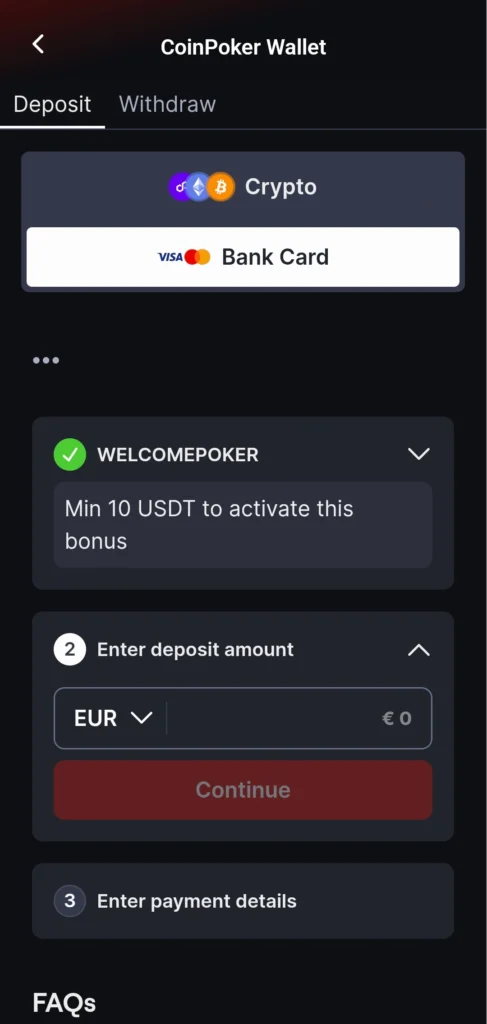
The cashier will often open directly into the deposit page, but you can also choose the Deposit tab in the cashier. Within there, you can do a couple of things:
Step 4: Choose a Payment Method
We have several options for you, including cryptocurrencies and card payments. Select the one you wish to deposit with.
Step 5: Choose Your Amount and Activate Bonus
In the ‘amount’ field, enter the total that you wish to deposit. On this screen, you can also input any promotional codes and select the Welcome Bonus or other offers you want to activate.

Step 6: Copy the Address to Send Funds To
If you are using cryptocurrencies, you will see a long, unique wallet address. Be sure to copy the full address (use the dedicated scan/copy button for this). Then, paste this address into your external wallet as the destination and approve the transaction.
Step 7: Wait a Few Moments for Your Balance Update
While most deposits are instant, funds may take a few moments to arrive, depending on blockchain congestion. Check your in-app balance, and as soon as the funds appear, you’re ready to head straight to the tables.